
What is WiFi 7, and should you care about it yet? In short, it is the newest generation of Wi-Fi, faster and more responsive than Wi-Fi 6. Its official name is IEEE 802.11be, and it was ratified in 2024, with the Wi-Fi Alliance certification program launching in January 2024. The headline number is a theoretical speed of up to 46 Gbps, but that is a lab ceiling, not something you will see at home. The real story is three upgrades that work together: wider channels, a smarter way of using multiple bands at once, and a denser way of packing data into each signal.
Table of Contents
What Is WiFi 7?
WiFi 7 is the seventh generation of Wi-Fi, based on the IEEE 802.11be standard. It works on the 2.4 GHz, 5 GHz, and 6 GHz bands, and it is backward compatible with Wi-Fi 6 and Wi-Fi 5 devices, so your old laptop and smart TV will still connect to a WiFi 7 router, just without the new speed benefits. The standard also supports up to 16 spatial streams, which is how routers send multiple data streams at once, up from 8 in Wi-Fi 6. It is designed for homes with many devices doing demanding things at once. The Wi-Fi Alliance lists the full details on its official site at wi-fi.org.
How WiFi 7 Is Faster: Three Key Upgrades
WiFi 7 is not one trick. It is three upgrades that add up, and each one solves a different problem.
320 MHz Channels
WiFi 7 doubles the widest channel from 160 MHz in Wi-Fi 6 to 320 MHz, but only in the 6 GHz band, where there is room for channels that wide. A wider channel is like a wider road: more data can travel at once. This is the biggest reason WiFi 7 can reach higher speeds, and why the 6 GHz band matters so much. On the 2.4 GHz and 5 GHz bands, channels stay narrower, so the speed gain there is smaller. The 6 GHz signal also fades faster through thick walls, so the widest channels help most in the same room as the router.
Multi-Link Operation (MLO)
Multi-Link Operation, usually shortened to MLO, is the most interesting new feature in WiFi 7. It is the first Wi-Fi standard that lets a device use multiple bands at the same time, for example 5 GHz and 6 GHz together, instead of picking one band and sticking to it. That brings two benefits: speed, because data can flow across two bands at once, and reliability, because traffic can switch bands instantly if one gets crowded. For gaming, video calls, and extended reality (XR) headsets, where a brief delay is noticeable, MLO is the upgrade that matters most. It also helps in crowded apartment buildings, where dozens of nearby networks fight for the same airwaves.
4096-QAM
The third upgrade is 4096-QAM, a denser way of encoding data into each radio signal. Wi-Fi 6 used 1024-QAM, and WiFi 7 packs about 20 percent more data into every transmission by comparison. The gain is real but modest on its own, and it works best when the device is close to the router with a strong, clean signal. Together with wider channels and MLO, 4096-QAM helps WiFi 7 reach its headline speeds and handle more devices without slowing down.
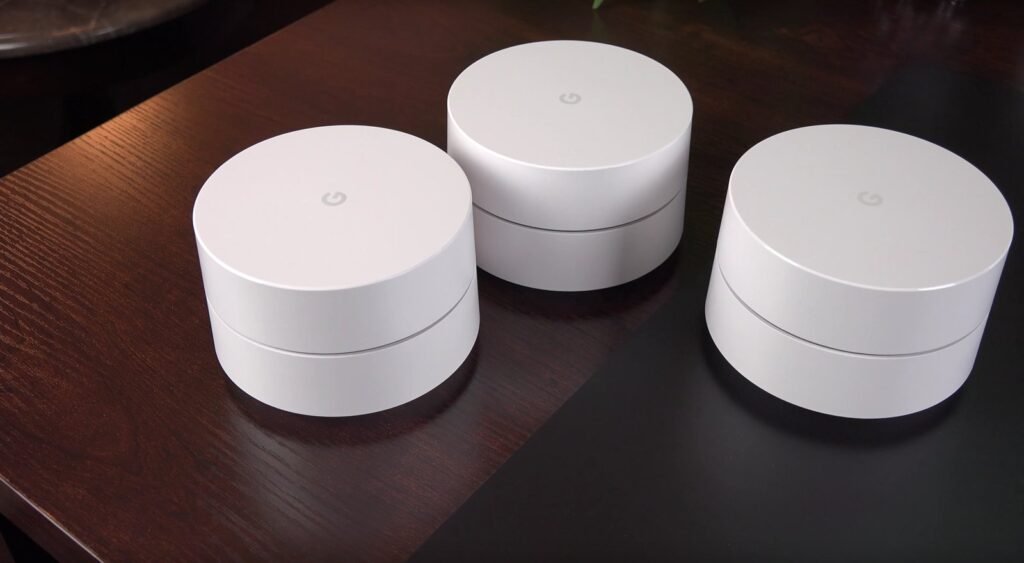
WiFi 7 vs Wi-Fi 6: What Actually Changes
| Feature | Wi-Fi 6 | WiFi 7 |
|---|---|---|
| Standard | IEEE 802.11ax | IEEE 802.11be |
| Widest channel | 160 MHz | 320 MHz (6 GHz only) |
| Multi-band use | One band at a time | Multi-Link Operation |
| Modulation | 1024-QAM | 4096-QAM, about 20% faster |
| Spatial streams | Up to 8 | Up to 16 |
| Theoretical top speed | 9.6 Gbps | Up to 46 Gbps |
| Best for | Browsing and streaming | 8K, XR, gaming, cloud |
The real-world gap is smaller: most homes will not see anything near 46 Gbps, because that assumes perfect conditions, a multi-gig plan, and WiFi 7 devices on both ends.
What Is WiFi 7 Good For?
WiFi 7 earns its keep in demanding homes. It is best for 8K streaming, where a single stream needs far more bandwidth than 4K, and for XR headsets, which need low latency to avoid lag and motion sickness. Online gaming benefits from the lower latency and quick band-switching of MLO, especially in crowded Wi-Fi environments. A busy household is the other big use case: if four people are streaming, gaming, and video calling at once, WiFi 7 keeps each connection steadier than Wi-Fi 6 does. For a classroom setting, a steadier network also helps online games run smoothly; our guide to Baamboozle for online classes explains what a good setup looks like for remote play.
Do You Need a WiFi 7 Router?
Before you buy, check two things. First, your internet plan: WiFi 7 routers are expensive, typically in the USD 400+ range, and you need a multi-gig internet plan to notice the speed difference. If your plan is 200 Mbps, a WiFi 7 router will not make it faster, because the plan is the limit, not the router.
Second, your devices: you need Wi-Fi 7 devices, such as a newer laptop or phone, to see the benefit. Older devices will still connect, but at the older speeds. Compare current models on the official TP-Link andASUS sites. When your network acts up, rule out simpler causes first: our guide to fixing Baamboozle not working covers the basic checks that fix most home network problems.
Quick Checklist: Should You Upgrade to WiFi 7?
- Check your internet plan: you need a multi-gig plan to notice faster speeds.
- Check your devices: you need Wi-Fi 7 devices to see the benefit.
- Count your household: many devices streaming and gaming at once is where WiFi 7 shines.
FAQs
What is WiFi 7 in simple terms?
What is WiFi 7? It is the newest Wi-Fi standard, IEEE 802.11be, ratified in 2024. It is faster and more responsive than Wi-Fi 6 thanks to 320 MHz channels, Multi-Link Operation, and 4096-QAM.
Is WiFi 7 backward compatible with older devices?
Yes. WiFi 7 routers work with Wi-Fi 6 and Wi-Fi 5 devices, and they work on the 2.4 GHz, 5 GHz, and 6 GHz bands. Older devices will connect normally, but they will not get the new speed and latency benefits.
Do I need WiFi 7 if my internet plan is slow?
No. If your internet plan is under about 1 Gbps, a WiFi 7 router will not make your internet faster, because the plan is the bottleneck. WiFi 7 helps most with a multi-gig plan, many devices, or fast transfers inside your own home network.
Is WiFi 7 worth it for gaming?
Yes, for competitive and XR gaming, mainly because of lower latency and Multi-Link Operation, which switches bands instantly when one gets crowded. For casual gaming, Wi-Fi 6 is still fine.